Cornell Note-Taking Method: A Structured Page Layout That Turns Lecture Notes Into Ready-Made Review Prompts
Many students lose time during review because their notes are just a wall of text with no obvious way to quiz themselves. The Cornell note-taking method solves this by using a structured page layout that separates raw notes from cues and a summary. If you have ever wondered how to take Cornell notes during a lecture, this guide explains the setup, the live process, and the review steps that turn your page into a ready-made study tool.
This method works well for students, professionals, and self-learners who want a repeatable system. It fits on paper or in a digital notebook, and it helps you capture information during class while building prompts you can use later for quick recall. If you are also exploring how to study well, this approach gives you a simple framework you can practice every day.
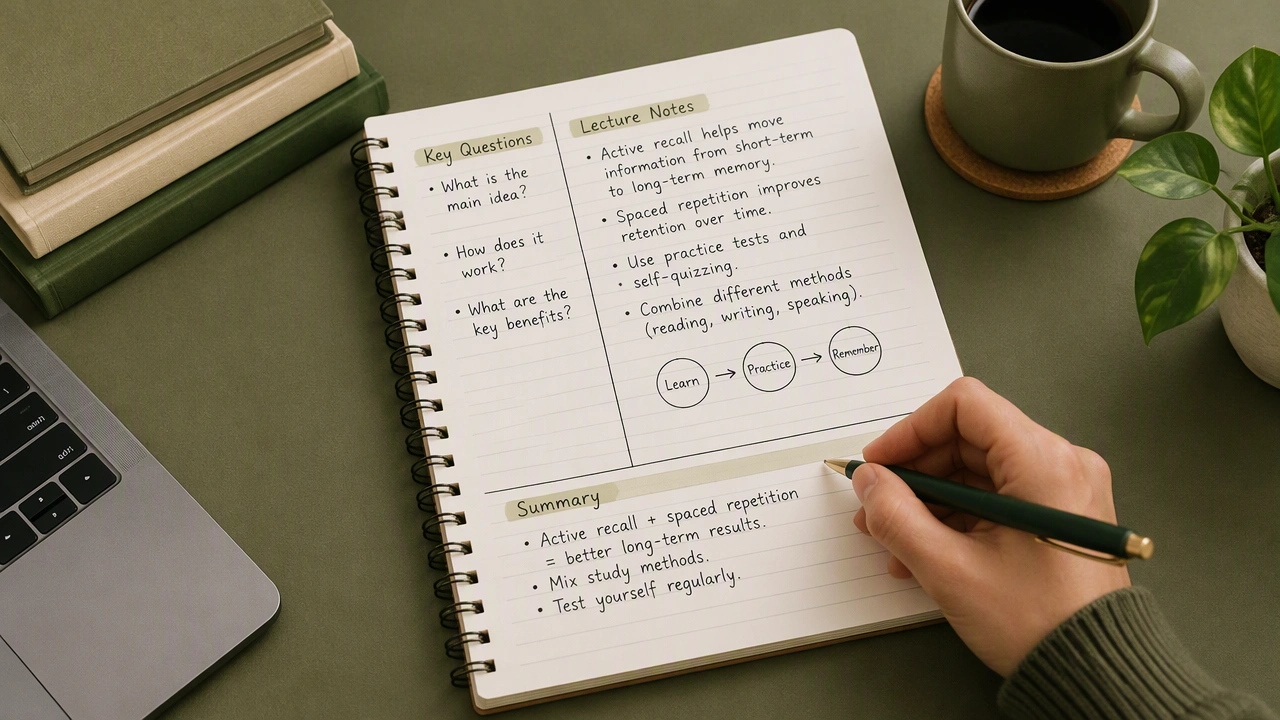
What the Cornell layout looks like
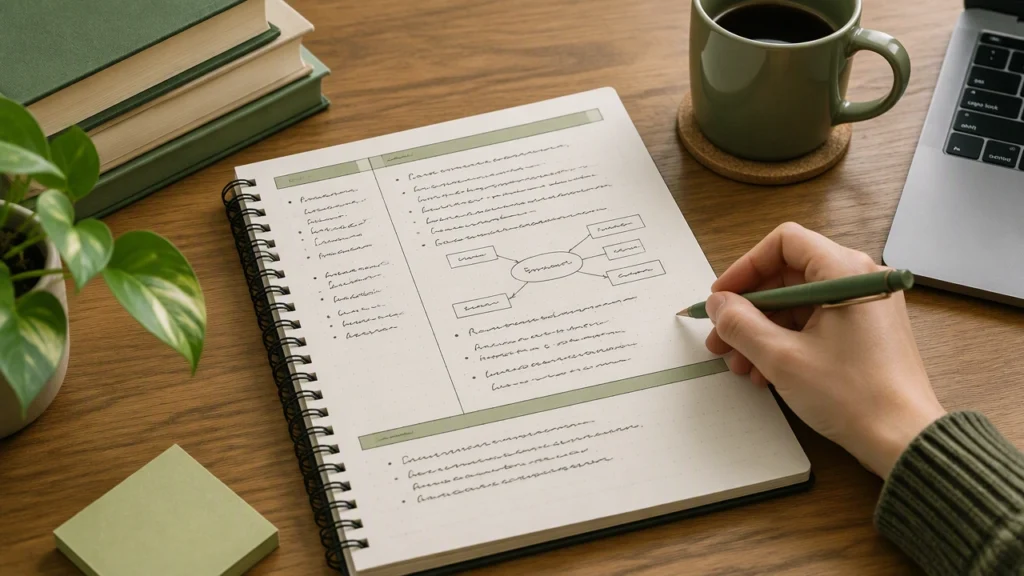
A standard Cornell page has three zones:
- Cue column on the left, about 2.5 inches wide, for keywords, questions, and short prompts.
- Notes area on the right, where you write the main ideas during the lecture.
- Summary strip across the bottom, a few lines that capture the big picture in your own words.
You can draw these lines by hand or use a template. The exact measurements matter less than keeping the zones consistent on every page. That consistency is what makes review predictable and fast.
Why this structure helps you learn
The layout supports three stages of learning: capture, organization, and retrieval.
- Capture: You focus on ideas during the lecture instead of formatting everything perfectly.
- Organization: You add cues and a summary soon after class, which helps you process the material while it is fresh.
- Retrieval: You cover the notes area and use the cue column to quiz yourself, which strengthens memory through active recall.
This sequence turns notes into prompts. Instead of rereading long paragraphs, you ask yourself questions and check your understanding. That habit builds deeper learning with less time.
How to take Cornell notes during a lecture
Follow these steps from the moment you sit down.
1. Prepare the page before class
Draw the cue column on the left, leave the right side for notes, and reserve the bottom for a summary. Add a header with the date, topic, and course. If you use a digital tool, set up a template so you do not repeat this setup every day.
2. Capture ideas in the notes area
During the lecture, write in the right column only. Use short phrases, bullets, and simple symbols. Do not try to write every word. Focus on definitions, steps, examples, and relationships. If the instructor shows a process, sketch a quick flow. If a slide has a key figure, note the number and what it means.
3. Add cues right after the lecture
Within a few hours, move to the left column. Turn headings into questions, highlight key terms, and mark what feels unclear. Use simple cues like Define, Compare, Why, and Example. These prompts become the basis for review.
4. Write a brief summary
In the bottom strip, write two to four sentences that capture the main point, the method or rule, and one application. Keep it short and clear. If you cannot summarize it, that is a signal you need to revisit the material.
A simple in-class workflow
During a live lecture, speed and clarity matter. Try this routine:
- Start each new topic on a fresh page.
- Use abbreviations you understand, such as def. for definition or e.g. for example.
- Leave small gaps between ideas so you can add details later.
- Draw a quick line or star next to anything you miss, then fill it in after class using a textbook or a classmate’s notes.
This approach keeps you present in the lecture. You are not polishing sentences; you are capturing ideas you can refine later.
Turning notes into review prompts
The power of Cornell notes is in how you use them after class.
- Cover the notes area. Look only at the cue column and try to answer each question out loud or on scratch paper.
- Check your recall. Uncover the notes and compare your answer to the original ideas.
- Mark gaps. Put a small dot next to cues you missed and revisit them the same day.
- Shuffle topics. Mix cues from different lectures to prevent relying on order.
This cycle is quick, focused, and effective. Ten minutes of cue-based review often beats thirty minutes of passive rereading.
A short example you can try today
Imagine a psychology lecture on memory. In the notes area, you jot down the difference between rehearsal and encoding, a quick example of each, and a diagram the instructor drew. In the cue column, you write: What is rehearsal?, What is encoding?, How do they differ?, and Give one example of each. In the summary, you write: Rehearsal repeats information to keep it active, while encoding moves it into storage. Better encoding strategies, like spacing and elaboration, improve retention. Now you have a page that works as a mini quiz.
Tips for digital note-takers
You can use the same layout in apps like Notion, OneNote, or GoodNotes. Create a Cornell template with three text blocks: cues, notes, and summary. Keep the template in a quick-access folder. During class, type or handwrite in the notes area, then add cues and a summary later. If your app supports tags, tag each page with the course and week so you can find topics quickly during review.
Common mistakes to avoid
- Writing too much. Long sentences slow you down and make review harder.
- Skip the summary. The summary is your anchor. It helps you see the point of the page at a glance.
- Ignoring unclear spots. Mark confusion early and resolve it the same day.
- Reviewing only once. Use spaced review over the next few days to lock in learning.
How to practice and repeat the method
Make Cornell notes your default for every lecture. After a week, you will have a stack of pages that double as review prompts. At the end of the week, skim your summaries to see patterns and connections across topics. At the end of the month, combine key cues into a master review sheet. This layered habit builds confidence before exams and helps you track progress over time.
With a clear layout, a simple in-class routine, and a short review cycle, the Cornell note-taking method turns lecture notes into ready-made prompts you can use again and again. If you want a structured way to capture ideas and study smarter, this method is a reliable choice you can start today.